
Listing Content Checklist
Everything you need to create a Raise Listing on TheAngel: company details, raise terms, deck, traction, story, team and data room files.

In short
- The listing form has nine steps. Only the data room is optional.
- Prepare your deck, raise terms, traction figures and team biographies first.
- The form saves as you go, and a draft is deleted after 90 days without activity.
Gather these items before you start your Raise Listing. The listing form saves your work, but you finish faster when everything is ready. Items marked Required must be complete before you can submit. All other items are optional, but they make your listing stronger.
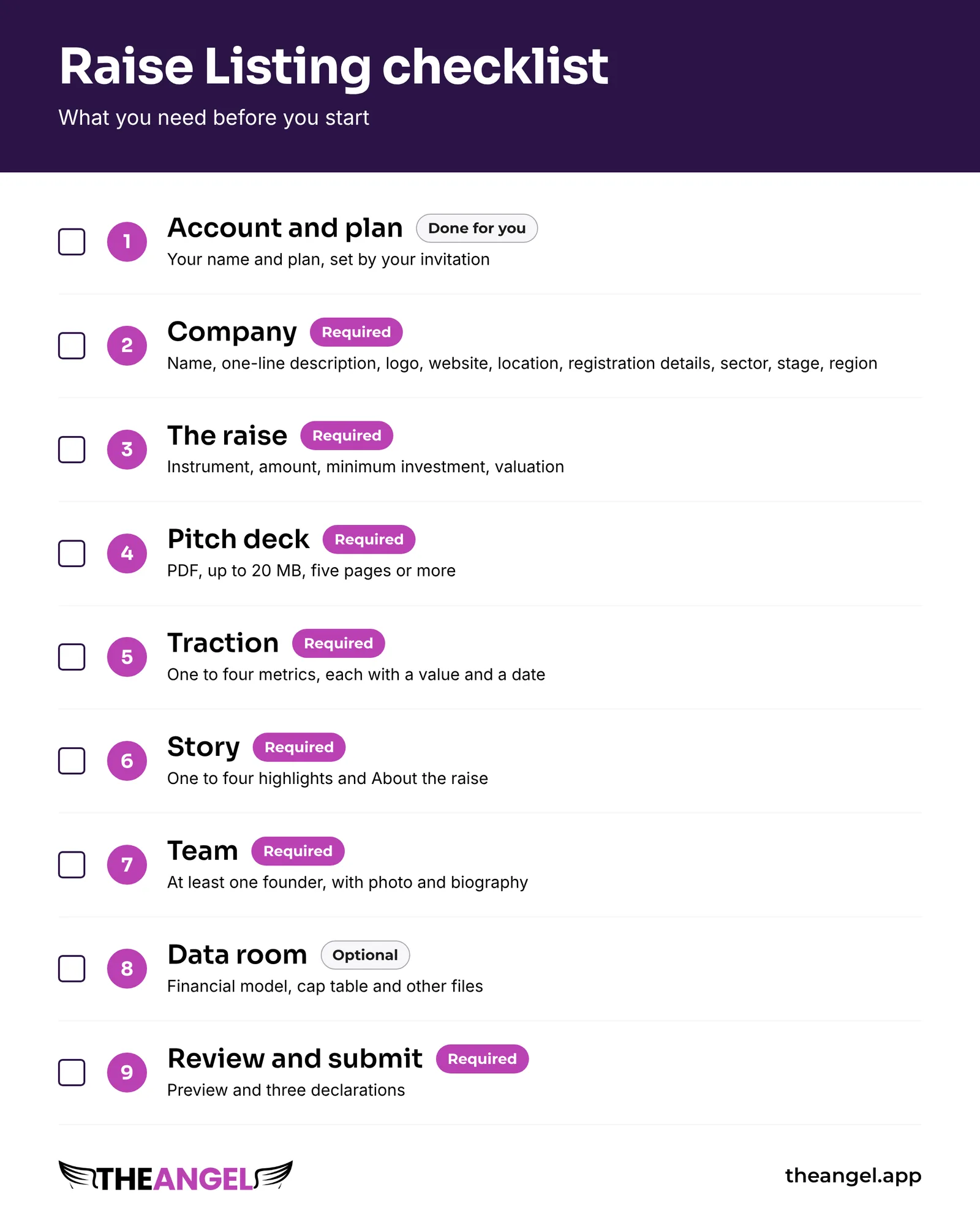
The form has nine steps. This checklist follows the same order.
Step 1: Account and plan (Required)
- An email address or Google account for sign-up
- The plan that you want to use
- Your latest pitch deck as a PDF
Step 2: Company (Required)
- Company name, 2 to 80 characters
- One-line description, 20 to 90 characters, on one line
- Logo as PNG or SVG, square, up to 2 MB
- Website address
- City and country where the company is based
- Company registration number
- Date of incorporation
- Sector
- Stage: pre-seed, seed, seed plus or Series A
- Region: MENA, UK, Europe, North America, APAC, Africa or LatAm
- Optional: up to five sector tags
Step 3: The raise (Required)
All amounts are in US dollars.
- Instrument: SAFE, convertible note or priced equity
- Amount that you raise, from 10,000 to 50,000,000
- Minimum investment, from 500 up to the amount that you raise
- For priced equity: pre-money valuation. It must be higher than the amount that you raise.
- For a SAFE or convertible note: valuation cap and discount. The cap must be higher than the amount that you raise. The discount is from 0 to 50 percent.
Step 4: Pitch deck (Required)
- One PDF, up to 20 MB, with at least five pages
The deck must work without you. An investor reads it alone. TheAngel rates the deck, and the rating shows on your listing. If you replace the deck later, the rating runs again.
Step 5: Traction (Required)
Add at least one metric. You can add up to four. For each metric, prepare:
- A label, 2 to 40 characters, for example "Monthly recurring revenue"
- A value and a unit: US dollars, count, percent, months or other
- An as-of date within the last 18 months
- A short note, up to 160 characters, that gives context
- The source record for each figure, such as a payment export or analytics report. Investors can ask for it.
Step 6: Story (Required)
- Required: at least one highlight. You can add up to four. Each is 10 to 80 characters.
- Required: About the raise, 200 to 1,500 characters. Say what you raise for and what the money achieves.
- Problem, up to 1,500 characters
- How it works, up to 1,500 characters
- Pitch video link from YouTube, Vimeo or Loom
- Cover image in 16:9 format, up to 5 MB
- Up to six product images
Step 7: Team (Required)
Add at least one founder. For each person, prepare:
- Name and role
- Photo, square, up to 2 MB
- Biography, 40 to 400 characters
- LinkedIn link (optional)
Step 8: Data room (Optional)
Your pitch deck is added to the data room for you. Add more files for investors who want to go deeper:
- Financial model
- Cap table
- Other files that investors ask for in diligence, such as a product roadmap or customer references
Files can be PDF, XLSX, CSV or DOCX. Each file can be up to 25 MB. You can add up to 20 files. Give each file a clear name and a category.
Step 9: Review and submit
- Look at the preview. It shows your listing as an investor sees it.
- Clear the list of missing fields.
- Accept three declarations: the information is accurate, you understand the risks, and you have authority to list the company.
Good to know
- The system saves your work on every step. You can leave and come back.
- If a draft has no activity for 90 days, the system deletes it. You get two reminders first.
- Steps 2 to 8 can be done in any order after you complete Step 1.
Next step
Read How a Raise Listing works to see what happens after you submit. Then create your listing at theangel.app.